How to puff
Here is everything, step by step. It takes a minute to learn, and after a few puffs it feels just like a normal smoking break.
Before your first puff
- Open the app and set your goal: how many cigarettes you smoke now and how many you want to skip each day. You can change it later.
- When you feel like a cigarette, tap the big Virtual puff button on Start, or the wind icon in the top right corner of any tab.
- The first time, SkipCig explains why it needs the camera and microphone, then iPhone asks for permission. Everything is analysed on the phone and never recorded.
Set up your phone
- Hold the phone or stand it in front of you, about 30–50 cm (an arm’s length) away.
- Your whole face and your hand near your mouth should be visible to the front camera.
- Good, even light helps. A lamp behind you or a dark room makes it harder.

With gestures (recommended)
The icons at the top of the screen show which step SkipCig is waiting for. The current one has a frame, finished ones turn green.
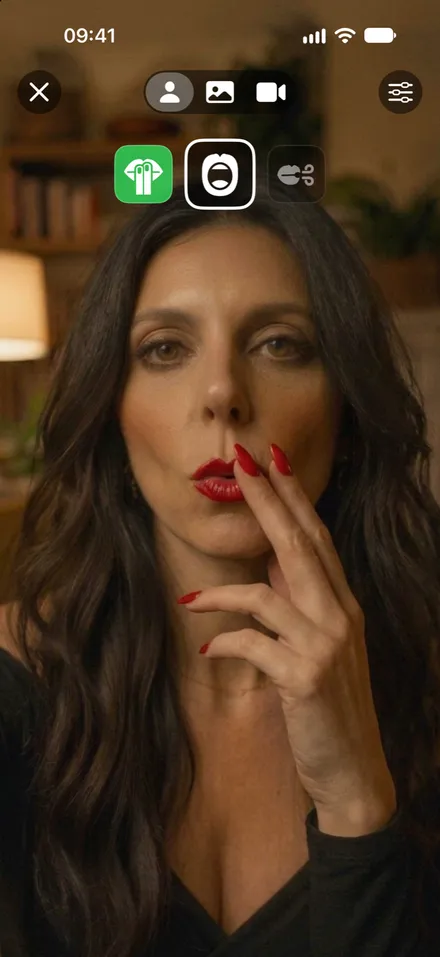
1. Fingers to your lips
Put two fingers (or a straw, a pen, any dummy) to your lips and hold them there for about a second, like taking a drag.
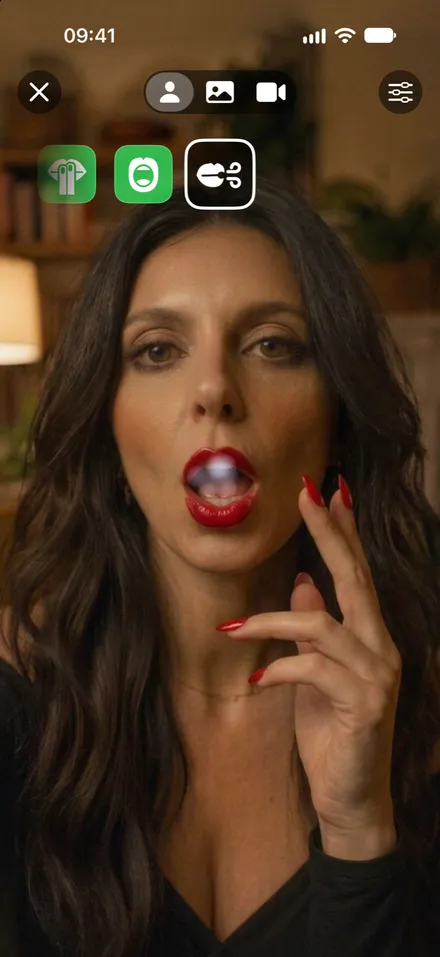
2. Take your hand away and inhale
Move your hand away and open your mouth wider, as if drawing the smoke in. A small puff of smoke appears in your mouth and is drawn in.
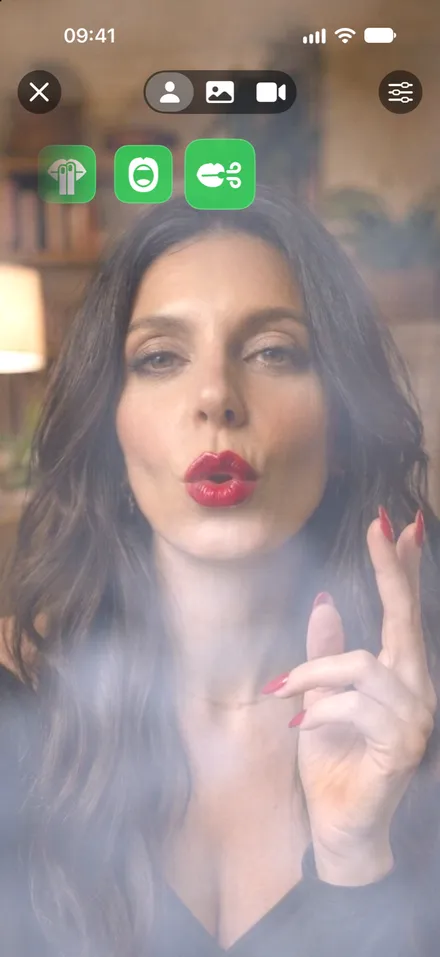
3. Blow it out
Purse your lips and exhale slowly, like blowing out a candle. Smoke flows for up to 3 seconds and goes the way you blow. Closing your mouth ends it.
No deep breath needed: breathe the way you normally would during a cigarette.
With the microphone
If gestures do not work well for you, switch to the microphone in the puff screen settings (the sliders icon in the top right). Then simply blow towards the bottom of the phone, where the microphone is, from closer than about 40 cm. In the Camera view, the microphone is always used, because the rear camera cannot see your hands.
- We recommend gestures. The microphone listens for the sound of blowing, so a loud noise nearby (tapping, rustling, wind) can sometimes start the smoke.
- If headphones with a microphone are connected, SkipCig listens to them instead. Then blow straight into the headphone microphone.
- By default the smoke starts only when your face is visible, so other sounds do not trigger it. You can turn this off in Advanced settings.
Choose what you see
Mirror
The front camera shows you, and the smoke comes out of your mouth.
Scenery
A calm video in the background. You pick it in the settings, and a small mirror in the corner shows you.
Camera
The rear camera shows the room in front of you, and you blow the smoke into it (microphone only).
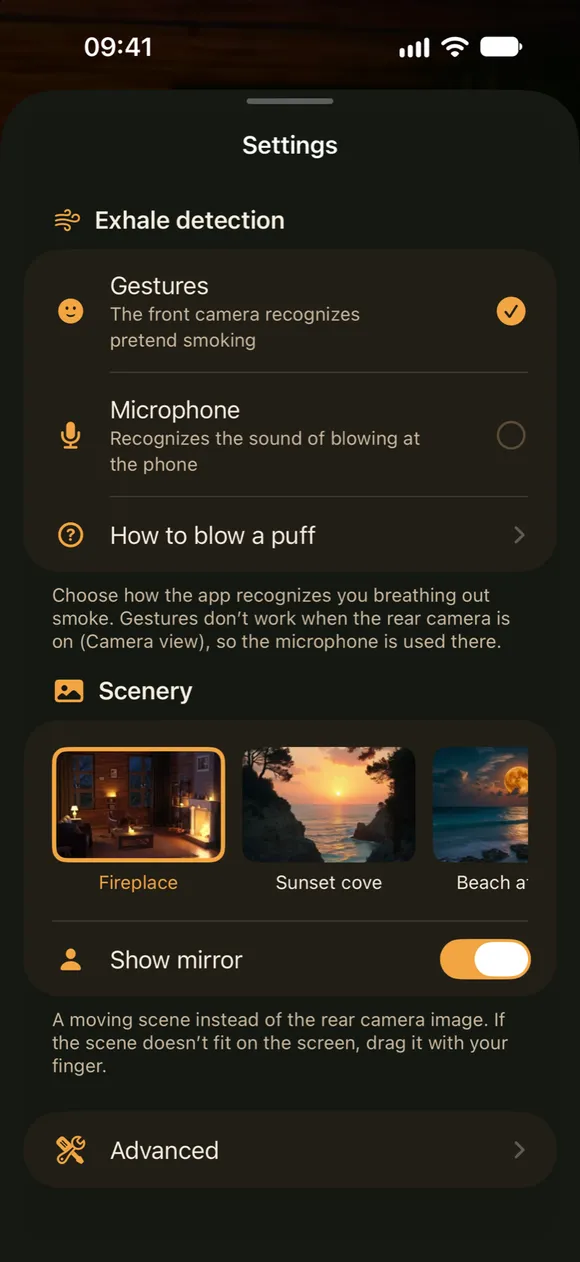
Puff settings
Tap the sliders icon in the top right of the puff screen. The sheet is see-through, so you can watch the smoke change while you adjust it.
Exhale detection
Gestures or microphone. Here you also find How to puff, a short reminder of both methods.
Scenery
Pick the video for the Scenery view (a fireplace, a cove at sunset, a beach at night, a mountain lake and more) and turn the small mirror on or off.
Advanced
Smoke amount in three levels. With the microphone also Sensitivity, which microphone is listening, and Only when your face is visible.
After the puff
- Each puff is saved automatically and shows up in your progress.
- If you smoke a real cigarette anyway, tap +1 cigarette on Start. SkipCig first offers a virtual puff, but if you smoked, just save it. No judgement: it is information, not a failure.
- Forgot to tap it? You can add the cigarette later with the right time (see below).
- Free puffs last 10 minutes a day while the puff screen is open. SkipCig Plus removes the limit.
Fix and keep your history
Mistakes happen, and plans change. Nothing here rewrites the past by accident.


Days
In Progress, tap any day, including an empty one, and choose Add cigarette with the time it happened (within that day, never in the future). Tap an entry to change its time or delete it, or swipe it left to delete it at once.
Goal
New goal ends the current goal yesterday and starts a new one today. The previous goal stays in Goal history with its result, such as 8 of 11 days within the limit. Correct fixes the limit of the current goal from its first day, for when you made a mistake.
Spending
New price applies from the day you choose, also in the past or only for a period. Each day counts with the price it had, so a price rise does not change what you saved before. Every price in the history can be corrected, moved or deleted.
The smoke does not appear?
The fingers icon stays framed
SkipCig cannot see your hand at your lips. Make sure your face and hand are fully in view, add some light, and hold your fingers at your lips for a full second.
An orange crossed-out face appears
Your face is not visible. Move the phone so your whole face is in the frame, or hold it a little further away.
It waits on the inhale step
Open your mouth a bit wider after taking your hand away.
It waits on the exhale step
Purse your lips more, or exhale a little longer. If it still does not work for you, try the microphone.
In microphone mode the smoke starts by itself
A sound nearby was taken for blowing. Lower the Sensitivity in Advanced settings, keep “Only when your face is visible” on, or switch to gestures.
In microphone mode nothing happens
Blow closer to the bottom of the phone and a bit harder. If an icon asks you to come closer, the phone is too far away.
A card says the camera or microphone is off
Permission was denied. Tap System Settings on the card and allow access for SkipCig.
Still stuck? Write to us.